
The best CMSs to build a website in 2025
Choosing the right CMS to build a website in 2025 means finding the balance between ease of use, performance and design freedom. Whether you are a content creator, an online retailer or a small business, this choice shapes the rest of your project. Below we cover the 10 best CMSs of the year, with a focus on Webflow, which gains ground every year. For each one, you will find its features, pros, cons, use cases and pricing.
1. Webflow, the designers' favorite CMS
Overview
Webflow is the go-to all-round tool for designers in 2025. It lets you build a website without writing a single line of code, with a lot of layout flexibility. If you want real creative freedom, Webflow covers that need.
Key features
Webflow offers an intuitive visual editor that shows how your site looks in real time. Hosting is built in, so you do not have to find a provider elsewhere. Performance follows, thanks to clean, optimized output code.
Pros
Webflow's biggest strength is SEO. You keep full control over tags, URLs and even structured data, which is everything Google needs to understand your site. Designers and marketing teams like it because it lets them build a custom site without going through developers.
Cons
Webflow takes time to learn. The first weeks can feel slow, then it becomes smooth and enjoyable to use. The interface is also entirely in English, so you need to be comfortable with the language.
Use cases
Webflow users include many designer portfolios, creative agency sites and startups. It is a very good choice if you want to stand out with a site that looks good and performs well.
Pricing
Webflow offers several plans. The free plan lets you work on your site as long as it is not published. Paid plans start at $14 per month for a showcase site and go up to $39 per month for a more complete ecommerce site. Team plans for collaboration are also available, starting at $19 per month per user.

2. Framer, the newcomer on the rise
Overview
Framer arrived more recently in the CMS world and quickly found its place. Built for small sites and designers, it lets you create interactive, animated sites while staying simple and intuitive.
Key features
Framer stands out for its visual design interface. You create animations and interactions without writing code. It is the right tool if you like visual effects and smooth transitions.
Pros
Framer suits people who want a polished user experience without becoming development experts. Sites perform very well thanks to a React-based architecture. Importing designs from Figma or Sketch is a real plus, even if it is sometimes approximate.
Cons
Framer lacks flexibility for complex projects. It works very well for small sites and portfolios, but shows its limits as soon as the project grows.
Use cases
Framer is often used for designer portfolios, showcase sites and creative projects that rely on a strong visual experience.
Pricing
Framer offers several plans. The free plan lets you test the tool with a single page. The first paid plan starts at €5 per month, and the Pro plan at €30 per month adds more pages, CMS collections and a higher number of monthly visitors.

3. Webstudio, design and performance combined
Overview
Webstudio is a close cousin of Webflow. It offers an equally powerful solution with a slightly different approach. It is a good alternative if you want to combine advanced design and technical performance.
Key features
Webstudio offers a flexible site editor with very advanced customization options. You control every aspect of your site, from fonts and animations to page structure.
Pros
If you are a creative with specific needs, Webstudio has a lot to offer. It suits people who want a ready-to-use solution with advanced customization features.
Cons
Support is limited for French-speaking users. Getting started can be harder if you are not fluent in English.
Use cases
Webstudio is often used for niche projects where customization matters a lot. Demanding designers who want to keep control over their whole project often pick it.
Pricing
Webstudio has very attractive pricing, with 5 free sites and, above all, unlimited users to work on projects. You can then use their hosting for $20 per month. You can also use your own hosting, and in that case the site editor is free to use.

4. WordPress, the long-standing giant
Overview
WordPress is the CMS everyone knows. With more than 40% of the world's websites built on the platform, it remains a reference choice for blogs, business websites and even some online stores.
Key features
WordPress stands out for its ecosystem of plugins and themes, which lets you customize everything from features to the look of your site. It is very flexible, whether you run a simple blog or a complex ecommerce site.
Pros
WordPress's first asset is its very large community. Whatever your question, someone has almost always found the answer already. WordPress is also SEO-friendly out of the box, and plugins like Yoast SEO help you improve your visibility on Google.
Cons
WordPress has its flaws too. Its popularity makes it a frequent target for hackers. You need to keep your plugins and installation up to date to avoid security vulnerabilities. Without development skills, you may also be limited by some themes and plugins.
Use cases
Millions of blogs, business websites and online stores use WordPress, including the TED Blog and the news site TechCrunch.
Pricing
WordPress is free in its basic version, but hosting is paid, starting at €4 per month. Premium themes and plugins cost from €20 to €200. Specialized WordPress hosts such as WP Engine also offer full management of your site, starting at €35 per month.

5. Shopify, the benchmark for ecommerce
Overview
If you want to create an online store without much technical hassle, Shopify is probably your best ally. Built for ecommerce, it lets you launch, manage and grow your store very simply.
Key features
Shopify includes a payment gateway, marketing tools and an intuitive interface that makes running the store easy, even without web development experience. Shopify is also PCI DSS compliant, which keeps your transactions secure.
Pros
Shopify's big advantage is its ease of use. Everything is designed so you can focus on selling without worrying about the technical side. Shopify also offers a wide range of themes and apps to adapt your store to your needs.
Cons
Shopify has its limits, though. Transaction fees apply if you do not use its own payment gateway, Shopify Payments. Customization options are extensive, but less flexible than on open-source platforms like WordPress.
Use cases
Brands like Gymshark and Allbirds use Shopify and have relied on its simplicity to grow quickly.
Pricing
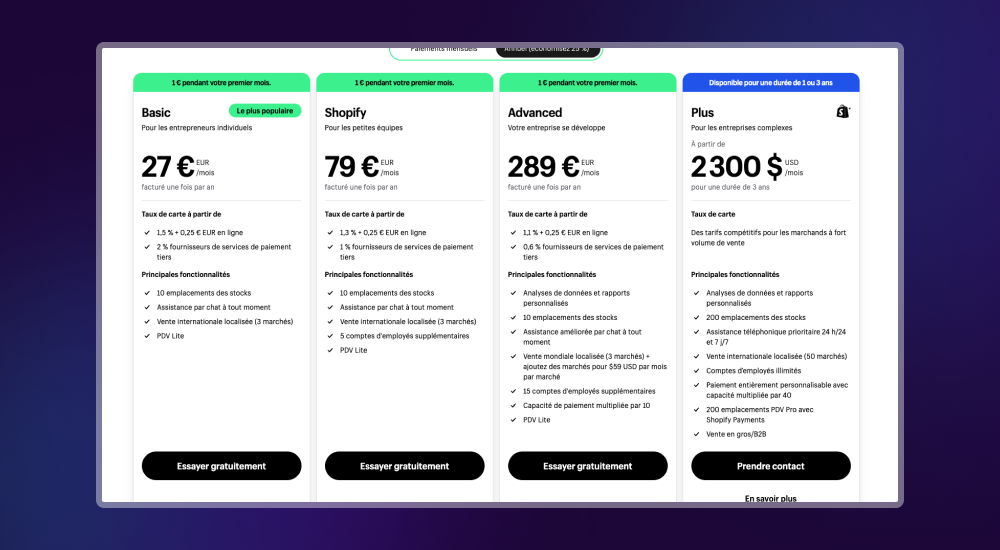
Shopify plans start at €27 per month for the Basic plan and go up to €289 per month for large businesses. Every plan includes secure hosting, and a custom domain name costs extra.
6. Wix, simple and quick to learn
Overview
Wix suits people who want to build a website without complications. Whether you are a small business, an artist or someone in a hurry, Wix lets you design a site in very little time with its drag-and-drop interface, without touching code.
Key features
Wix offers a wide selection of professional templates, all optimized for mobile. Its App Market makes it easy to add features such as contact forms, photo galleries or ecommerce options.
Pros
Wix's main advantage is its simplicity. You can create a site in minutes with no technical knowledge. Wix also handles hosting and maintenance, so you can focus on content.
Cons
On the other hand, Wix is fairly limited in customization. For a very specific or complex need, you may feel constrained. Once you have chosen a template, it is also hard to switch without rebuilding your site from scratch.
Use cases
Wix is often used for small business websites, personal portfolios or blogs that do not need advanced features.
Pricing
Wix offers a free plan that shows Wix ads on your site. Paid plans start at just under €14 per month and include a custom domain name and more features. For online stores, plans start at just under €27 per month.

7. Squarespace, the creatives' choice
Overview
If you are a creative looking for an elegant website that is easy to manage, Squarespace has a strong case. The platform is known for its polished designs and high-quality templates. Whether you are a photographer, a designer or a small business owner, you get a professional-looking site with little effort.
Key features
Squarespace stands out for its well-designed templates, all responsive and mobile-friendly. The platform also offers built-in SEO tools, ecommerce options and detailed analytics to track your site's performance.
Pros
Squarespace's biggest asset is its ease of use. Everything is intuitive, and even advanced features, such as adding an online store, are simple to set up. Sites built with Squarespace also look very good, thanks to templates that showcase your content.
Cons
Despite its simplicity, Squarespace can be rigid if you want to customize every detail. There are also fewer third-party integrations than on open-source platforms like WordPress.
Use cases
Squarespace is often chosen by artists, photographers and design agencies to present their work in a professional, elegant way.
Pricing
Squarespace plans start at €11 per month for a personal site and go up to €36 per month for advanced features, ecommerce included. Every plan includes a custom domain name and built-in SEO tools.

8. Joomla, the versatile solution
Overview
Joomla is a versatile, adaptable CMS that can handle complex projects. In terms of complexity, it sits between WordPress and Drupal and offers a good balance between power and ease of use. If your site needs fine-grained user management or specific features, Joomla deserves a look.
Key features
Joomla is valued for its ACL capabilities (Access Control List), which let you define very precise user permissions. It is also multilingual by default, which makes it a good choice for international sites. Its content management is flexible and lets you use several templates on the same site.
Pros
Joomla's big advantage is its flexibility. It is robust enough for complex sites and stays accessible if you do not want to go deep into code. Joomla also has an active community that provides extensions and modules to customize your site.
Cons
Joomla takes longer to learn than WordPress. It can intimidate beginners, and it has fewer extensions than WordPress, which reduces your options.
Use cases
Joomla is often used for government websites, nonprofits or institutions that need a solid structure and advanced user management.
Pricing
Joomla is free, but hosting is paid, usually starting at €3 per month. Some extensions and modules are paid, from €20 to €100 depending on your needs.
9. Drupal, power and security for large projects
Overview
If you need a CMS that can handle very complex sites with a high level of security, Drupal is the solution to consider. Known for its robustness and scalability, it is often chosen by large companies, universities and public institutions. Its flexibility is remarkable, but it is demanding to learn.
Key features
Drupal stands out for its modular architecture, which lets you add specific features through thousands of modules. On security, it is one of the most reliable CMSs, with regular updates and an active community that watches for potential vulnerabilities.
Pros
Drupal's main advantage is its scalability. Whether you run a small blog or a very high-traffic site, Drupal adapts to your needs. Its user management is also very fine-grained, which lets you build complex permission systems.
Cons
Drupal's main drawback is its complexity. To get the most out of it, you often need solid technical skills or specialized developers. That adds a significant extra cost.
Use cases
Drupal is often chosen for multinational corporate websites, universities or government organizations that need a secure, highly customizable platform.
Pricing
Like Joomla, Drupal is free to download and use, but hosting and maintenance can be expensive. Hosting usually starts at €5 per month, and costs rise quickly with development needs, which can range from €5,000 to €50,000 or more for complex projects.
10. Ghost, the minimalist CMS for content creators
Overview
Ghost is a CMS built for content creators who want a simple, fast, clean platform. If you want to launch a blog or a paid newsletter, Ghost is made for you. It focuses on a single job, publishing content efficiently, where other CMSs try to do everything.
Key features
Ghost offers a streamlined content editor to write and publish articles quickly. The platform is lightweight and optimized for loading speed, which helps keep your readers. Ghost also includes monetization options such as paid subscriptions, useful if you want to monetize your content.
Pros
Ghost's main advantage is its simplicity. It skips superfluous features, which makes the experience very smooth. Ghost is also open source, so you can host it yourself and keep full control over your site.
Cons
Ghost can be limited if you need many integrations or advanced features. It is a very specialized CMS, and you may find it restrictive if you need more flexibility.
Use cases
Ghost is often used by professional bloggers, journalists and newsletter creators who want a simple, effective platform to publish and monetize their content.
Pricing
The self-hosted version of Ghost is free to download, but you pay for hosting yourself. Ghost also offers a hosted solution, with plans from $9 per month for individual creators up to $199 per month for businesses with advanced needs.

Bonus, Notion Sites turns the productivity tool into a CMS
Overview
Notion, originally a productivity app, quickly became an all-in-one tool that some creators now use to host their website. Notion is not a traditional CMS, but it lets you quickly create web pages shared with the public. It is an interesting option for small projects or personal sites.
Key features
Notion lets you create pages easily with a drag-and-drop interface. You can embed multimedia content, databases and even interactive documents. Its main appeal is to bring productivity and content management together in one tool.
Pros
The main advantage of Notion Sites is its versatility. You create a site directly from your Notion pages, which works well if you want a simple, fast site without complex setup. Notion is also very easy to use and requires no development skills.
Cons
Notion is not designed for complex sites or feature-rich ones. It lacks many functions found in traditional CMSs, such as advanced SEO options or plugins.
Use cases
Notion Sites is often used for personal sites, portfolios or small blogs, when simplicity and speed of creation come first.
Pricing
Notion offers a free plan to create and share public pages. For more advanced features, such as a custom domain name, paid plans start at $8 per month, a very affordable option for small sites.

Which CMS to choose to build your website in 2025
In 2025, the right CMS depends above all on your needs and the nature of your project. Webflow remains the preferred choice for creatives who want a lot of freedom without code. Framer and Webstudio stand out for their ease of use and creative potential. WordPress and Shopify remain safe bets, the first for content sites, the second for ecommerce. For large companies or complex sites, Joomla and Drupal offer robust solutions. Ghost and Notion Sites suit content creators who want simplicity. In every case, check that your CMS matches your long-term goals to get the most out of your website.