
As Webflow experts, we wanted to test a tool that is getting a lot of attention right now, Bubble.io. We applied the no-code skills we built on Webflow to Bubble to see what we could get out of it.
This Webflow vs Bubble comparison aims to be honest. It should help you choose the no-code tool that fits your project.
Here is what we cover:
- Ease of use and interface
- Pricing plans
- Available apps and integrations
- Templates
- SEO capabilities
- AI capabilities
- Available resources
- Customer support
Let's start with a short introduction to the 2 services and a quick comparison.
What is Webflow?
Webflow is a web design and development platform. It lets you build responsive websites, including e-commerce stores, without development skills. It gives you a visual interface to design pages and add custom code, along with hosting and e-commerce support. It also handles interactive elements and animations.
Webflow serves a wide audience, from beginners to experienced designers and developers. It is known for connecting design and development.
What is Bubble?
Bubble is a no-code web development platform focused on building web applications and dynamic websites. It lets you create database-driven applications with user authentication, workflows and complex logic, without traditional coding skills. Bubble is meant for people who want to build interactive, data-driven web applications without writing code. The closest service to Bubble is probably FlutterFlow, and the 2 are very popular in the no-code space today.
Bubble offers visual development tools and many integrations with third-party services. It puts functionality ahead of design.
Use cases, who should use Webflow and who should use Bubble?
Who should use Webflow?
- SMBs. They need professional websites without heavy development, and a simple CMS to update their content.
- Large companies. They need solid, scalable and polished websites that connect well with their marketing tools and CRM.
- Freelance designers. They want to build custom websites efficiently, with a lot of design freedom and without advanced coding knowledge.
- Online stores. They need attractive stores with simple product and inventory management.
- Portfolio sites. Artists, photographers and designers need a platform that showcases high-quality visuals with a custom design.
- Marketing teams. They need to create and manage landing pages quickly, with A/B testing and SEO tools to generate leads.
Who should use Bubble?
- Startups. They need to build MVPs quickly, with custom features and interactivity, without a full development team.
- SaaS companies. They need complex web applications connected to various third-party services and APIs.
- Non-technical entrepreneurs and founders. They want to build complete web software without advanced development knowledge, with scalability in mind.
- Custom business applications. Companies need internal tools and dashboards with solid data and user management.
Webflow vs Bubble, a quick comparison
Webflow and Framer offer similar services. Webflow and Bubble do not serve the same purpose. Here is an overview of what sets them apart and what you can expect from each.

Webflow
- Web design and development. Webflow is mainly for building websites. It provides a visual interface to design them, including e-commerce sites.
- For designers. It suits people who want control over their site's design, from beginners to experienced developers.
- Custom code. You can add your own code when needed.
- E-commerce. It lets you build online stores with a shopping cart and payment processing.
- Hosting. Webflow hosts websites, so you can publish yours directly on its servers.
Bubble
- Web applications. Bubble is more focused on building web applications. It lets you create database-driven applications with user accounts, workflows and complex logic.
- Data. It is known for handling data well, which makes it a good choice for applications with a lot of user-generated content and interactions.
- No-code. Bubble is for people who do not want to code at all. You can build complex features without writing code.
- Integrations. It connects to third-party services and APIs, so you can add external tools and data to your application.
- Function first. The design can still be customized, but Bubble prioritizes functionality.
The 2 services do overlap. For example, you can build web applications in Webflow, even though websites remain its main focus.
In short, use Bubble to build a web application and Webflow to build a website.
Ease of use and interface overview
With no-code, skipping the code is not enough. You still need to understand the logic of what you build and think in terms of algorithms.
That is why neither Bubble nor Webflow is simple to pick up. Webflow stays easy as long as you build simple pages for individuals or small businesses. As soon as a Webflow project gets more ambitious, there is a lot to learn.
The Webflow interface

Webflow's main tool is called the Designer. It contains everything you need to design, build and maintain a website.
Here is what the Designer offers:
- Add element. Insert elements such as text, images, buttons and forms in a few clicks.
- Components. Create elements and reuse them across pages to keep the site consistent.
- Navigator. Organize and select elements in a hierarchical view.
- Pages. Manage and design each page, including its interactions and transitions.
- CMS. Build and manage dynamic content such as blog posts, products and templates.
- Logic. Set up interactions and workflows triggered by events and actions.
- Users. Manage user authentication, sign-up and access control.
- E-commerce. Manage products, carts and payment processing for your online store.
- Apps. Integrate third-party services to extend your site's features.
- Assets. Upload and manage media files such as images, videos and documents.
- Settings. Configure SEO, custom code, domains and other site settings.
- Site activity. Track changes and actions on the project to collaborate as a team and stay in control.
The Bubble.io interface
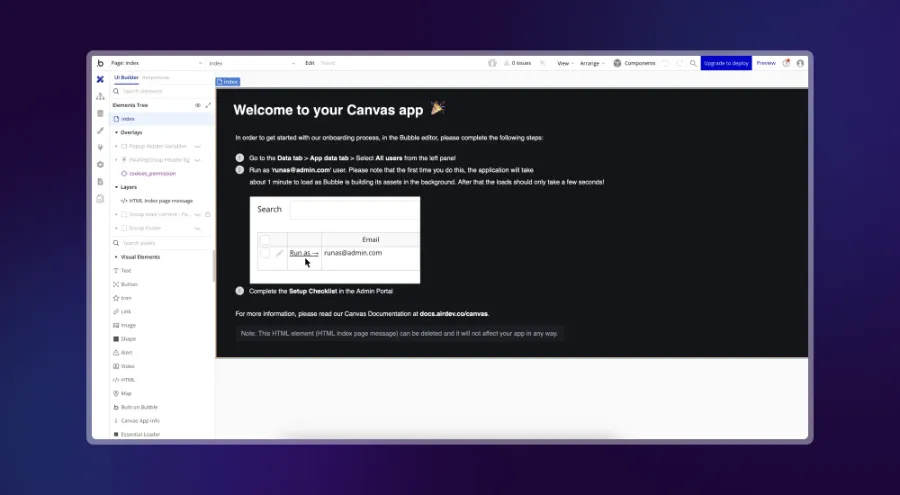
At first sight, Bubble's interface can feel a little confusing and takes some getting used to. The design part feels more natural, but you need to adopt a developer mindset right away to be comfortable with the tool.
Bubble offers a wizard for newcomers. You start building your app by answering a few questions and adjusting its colors. The message is clear. You set up the design quickly and move on to developing the app.
For a development tool, Bubble offers a surprising number of options. It also includes responsive design features.
Here are the main options in the left-hand menu:
- Design. This section lets you design the web application's interface visually. You create and arrange elements such as text, buttons or forms, which defines the look and usability of the project. This is where the application's front end is built.
- Workflows. This section defines the application's logic and features. Workflows specify what happens when users interact with the app. For example, you can trigger actions when a button is clicked, when data is submitted or when a user logs in.
- Data. This is where you manage the application's database. You create data types, define fields and add records. This section stores and organizes the information the app needs, such as user profiles, content or product data.
- Styles. They control the app's visual appearance. You define custom styles for elements (fonts, colors, spacing) to keep a consistent, polished design across the whole app.
- Plugins. Bubble offers a range of plugins that extend the app's features. In this section, you find, install and manage these ready-made add-ons. They help you integrate third-party services, add advanced features or improve the user experience.
- Settings. This section holds the Bubble project's configuration. You will find privacy rules, domain settings, API keys and the other global settings that affect how the app works.
- Logs. They record the app's activity and user actions. You can monitor them to fix issues, track user interactions and analyze the app's performance. They are especially useful for debugging and improving features.
Bubble.io vs Webflow pricing plans
Webflow and Bubble each offer a free plan. These plans have their limits and restrictions, but they are enough to get started and learn the tools. Here is an overview.
Webflow pricing
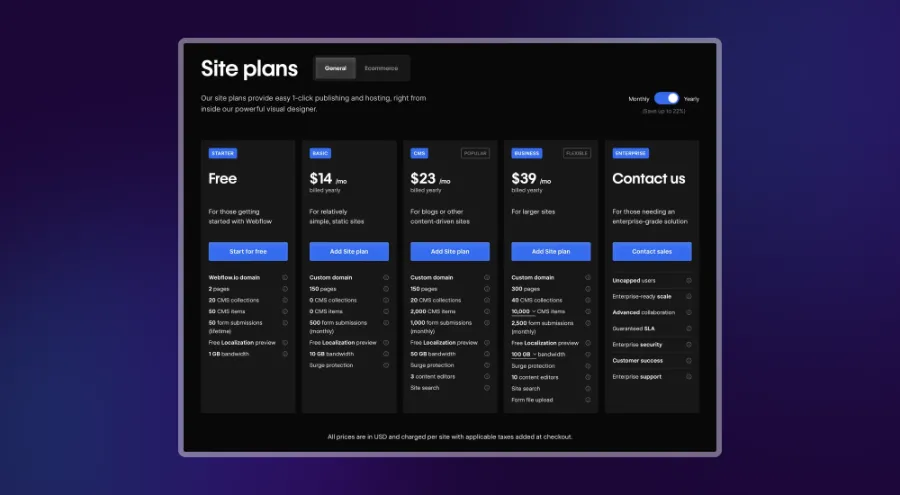
Webflow pricing is complex. It is split into 2 main groups of plans, one for people who want to build and host a site, the other for in-house teams, freelancers and agencies. If you work alone, you can choose the cheapest hosting plan, at $14 per month.
If you want to use Workspaces and their collaboration features, you will need one of the Workspace plans on top of the hosting plan.
Bubble.io pricing

At first glance, Bubble's pricing looks simpler than Webflow's. That is only an impression.
The plans are split as follows:
- Free
- Starter
- Growth
- Team
- Custom
Each plan has its own specifics, and you need to check carefully which one matches the size of your project. We noticed that the more expensive plans include more editors, which is very useful for teamwork. The Team plan lets you add 5 app editors, while the free version allows only 1.
Another important metric is the number of workload units per month. Its exact definition remains vague, but it measures how many resources your app uses on Bubble. The free plan allows 50,000 workload units per month, and the Team plan 10 times more.
If you go over this limit, you can buy additional units.
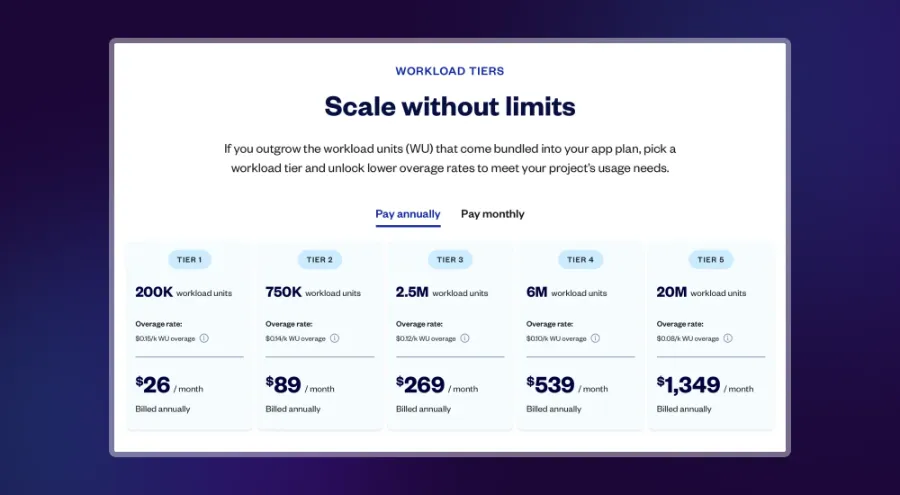
After analyzing the pricing plans of the 2 services, our conclusion is simple. They are not comparable, because their structure is almost entirely different. Bubble's plans cover development capabilities, while Webflow's cover hosting, the CMS, collaboration and other options.
Available apps and integrations
By apps and integrations, we mean everything that can be added to the core tools from the outside. Webflow and Bubble both offer plenty.
Apps and integrations in Webflow
Webflow now supports hundreds of integrations, and you can connect all the popular services, including HubSpot, Shopify, Stripe or Mailchimp. Most of them are easy to connect. For more complex operations, you will need development skills and a good knowledge of the service you connect to Webflow.
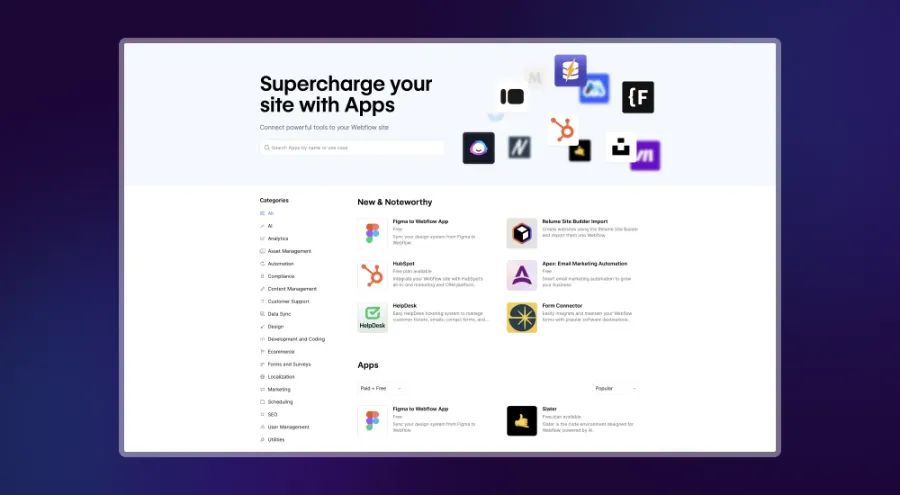
Webflow is actively working on new ways to extend its services, especially with in-house and third-party apps. For example, the new Apps section will let you browse apps related to the following areas:
- Content management
- Content design
- Customer service
- Customer engagement
- Development
- Security
- E-commerce
- Booking
- Marketing automation
- Analytics
- Productivity
- Language
This gives you a wide range of useful apps to build and manage your marketing site.
If you choose Webflow, we recommend browsing all the available integrations to know your options. Keep in mind that many of these apps are built by third parties and are paid, either as a one-time purchase or with a monthly subscription.
Apps and integrations in Bubble.io

Bubble also offers a range of in-house and external plugins that help you develop web applications visually. More than 5,000 plugins are available, including popular ones such as Toolbox (JavaScript utility elements), API Connector, Ionic Elements or Google Material Icons.
The apps are grouped into several categories, including:
- Analytics
- AI
- Blog
- Compliance
- Containers
- Customer support
- Data
- E-commerce
- Health and fitness
- Input forms
- Internationalization
- Localization
- Media
- Mobile
- News
- Payment
- Productivity
- Small business
- Social network
- Technical
- Testing
- Video
- Visual elements
- Web scraping
Browsing these apps can be a little confusing, because it is hard to tell which one will suit you best. Bubble shows how many projects use each app, which helps you decide. You can also sort them by rating, price or name.
Many of these apps are free, but there are paid ones too, with very different prices (there are thousands of them).
Webflow and Bubble templates
Webflow and Bubble both offer templates to speed up your no-code project. They are highly customizable and adapt to your needs. The difference lies in how they are used. Bubble templates cover many use cases, while Webflow's are mostly meant for marketing sites.
Webflow offers more than 2,000 templates, and the number keeps growing thanks to an active community.
Search and many filters help you find the right template, which you then copy into the Designer to customize. Webflow templates are all highly customizable, so you can change almost everything. You can browse them by category, language, style or feature.
Most Webflow themes are paid. Some cost more than $120.
Bubble offers around 1,300 templates in the following categories:
- Blog
- CRM
- Dashboard
- Game
- Landing page
- Marketplace
- Online store
- Portfolio
- Social
- Directory and listings
- Professional services
- On-demand services
- Project management
- Building blocks
- Other
Many free templates can be applied to your project right away. You can also pick paid templates, with prices from a few dollars to more than $100. These templates are apps you customize by changing the look, the logic and everything else Bubble lets you do.
We tested one of them to build an app. The experience was quite exciting, because dozens of workflows were already set up and all the styles were easy to change. Most of these templates look like ready-to-use white-label apps. You still need an experienced Bubble developer to configure them in more detail and launch the app.
Bubble did good work with these templates, which really help developers get started on a no-code app.
Webflow or Bubble, which is better for SEO?
Webflow is generally considered stronger in built-in SEO. It was designed with web design and search in mind, and it makes it easy to apply best practices for organic traffic. If your main goal is to attract visitors through Google and other search engines, Webflow should be your first choice.
Here are some of Webflow's main SEO features:
- Built-in SEO tools. Webflow is known for its native SEO tools. You can add title tags, meta descriptions and alt attributes to images. You can also customize URLs and create a sitemap.
- Clean HTML and CSS. Webflow generates clean, semantic HTML and CSS, which helps SEO. Search engines favor well-structured code, and Webflow is very good at it.
- Speed and performance. Webflow's hosting infrastructure is built for fast load times, an important SEO factor. You can also enable hosting through a content delivery network (CDN) to load pages even faster.
- 301 redirects. Webflow lets you set up 301 redirects, which you need to keep your rankings when you change URLs or migrate content.
- Structured data and rich snippets. You can add structured data and Schema markup in Webflow to improve how your content appears in search results, which can raise the click-through rate.
- Responsive design. Webflow's responsive features give you a mobile-friendly site, which matters in Google's algorithm.
A lot of content also focuses specifically on Webflow SEO, including our Webflow SEO guide and our technical Webflow SEO guide. Many providers also specialize in SEO for Webflow sites.
Bubble is more focused on web application development. It offers SEO customization options, but it can take more effort and third-party tools to reach Webflow's level of optimization. We found an interesting SEO guide for Bubble users. The people behind the service have clearly taken SEO into account, and there is probably room to improve.
For SEO, Webflow is the ideal solution. Bubble, focused on development, is much less suited.
Bubble and Webflow and AI
Webflow and Bubble have both opened up to AI, and Bubble has a slight lead. Webflow has been surprisingly quiet on the topic, but you can already connect OpenAI with the help of a Webflow expert and experiment.
The best of AI still seems to be coming for Webflow, since announcements have already been made. It is only a matter of time before Webflow launches its own AI tools.
We did not find any built-in AI capability in Bubble either. Bubble does seem further ahead on AI and even promotes its ability to integrate OpenAI. Several available third-party apps also use AI.
Learning resources
It is hard to separate the 2 tools objectively on this point. Webflow and Bubble each have large knowledge bases, all free. In both cases, mastering the tool takes a lot of work, because the learning curve is steep.
Webflow's Resources tab offers many options. The apps and templates mentioned above are part of it. The Webflow Marketplace also brings together various libraries to help you build sites. The Made in Webflow section showcases projects submitted by users, and some of them can be copied for free into your Designer to customize.
We especially like the Experts section, where you can browse freelancer and agency profiles.
If you are new or want to learn, the Learn part of the dropdown menu is the most useful. You will find the Blog, Resources and Webflow TV there.
Finally, Webflow University remains the go-to resource to get started with Webflow.
Webflow also offers complete learning resources created by users, in the Community and Developers sections. You will find many more outside the official site, including on our website, which offers articles and other resources.
Bubble's offering is very close. Its Academy takes beginners to an advanced level with tutorials, manuals, interactive lessons and videos. The Bubble Marketplace also gives a full view of the resources created by the company and by users, along with a selection of agencies that work with Bubble. We like the coaching offer, with Bubble experts running one-on-one sessions billed between $100 and $150 per hour.
Bubble also has an active forum where you can talk with other community members and get help from other users. Webflow has a forum too. The 2 are hard to separate, because both communities are active and all registered users can join the discussions.
Customer service
At Ouiflow, we have had many positive experiences with Webflow's customer support, but that is not the general opinion. Reaching Webflow support is difficult, because the journey pushes you to find solutions on your own. That is why there is an active forum where you can get help from representatives.
Bubble has a more accessible approach to customer support, but only if you want to talk about sales or partnerships. The support center always sends you back to searching the FAQ and its many articles.
We especially like the AI chatbot, which promises to put you in touch with a real person if it cannot find the answer.
Webflow pros and cons
Webflow pros
- Scalability. Webflow is built to grow with your marketing site and your business.
- Design freedom. Webflow offers wide design possibilities and lets you build striking, unique websites without coding.
- Easy-to-use CMS. Its intuitive CMS makes it easy to update and manage the site's content on a regular basis.
- SEO tools. Built-in SEO tools help optimize the site for search engines and improve its visibility and rankings.
- Fast development. Webflow lets you build a site quickly, which works well for marketing campaigns and tight deadlines.
- Built-in e-commerce. It offers solid e-commerce features to set up and manage an online store easily.
- Responsive design. It gives you mobile-friendly sites that look good on every device.
Webflow cons
- Learning curve. Webflow's advanced design tools are powerful, but they can be hard for beginners to pick up.
- Limited back end. Webflow is not suited to complex back-end logic or heavily database-driven applications.
- Support. Customer support can lack responsiveness for urgent, highly complex issues.
Bubble pros and cons
Bubble pros
- Development without code. Bubble lets you build complete web applications without coding.
- Custom features. It offers wide customization options and lets you build complex workflows and applications.
- Third-party integrations. It connects easily to many APIs and third-party services, which adds to your apps' features.
- Rapid prototyping. It is ideal for quickly prototyping and testing new features or applications.
- Community. A strong community and many resources help you learn and solve problems.
Bubble cons
- Performance. Very large or complex applications can get slower.
- Learning curve. Bubble requires no code, but using its full potential takes a lot of time.
- Design limits. It is less visually flexible and less intuitive for design than website tools such as Webflow.
- Cost. The bill can climb as your application grows, especially with high traffic and advanced features.
- SEO. Its default SEO capabilities are weaker and take extra effort to optimize.
- Platform dependency. Your app relies heavily on Bubble's infrastructure, which reduces your control over hosting and scaling.
Conclusion, who wins?
Webflow and Bubble are competitors, but naming a winner is difficult, because they mostly serve different goals. Webflow is for building marketing sites, but it can also produce applications. Bubble is for building web applications, but it can also produce marketing sites.
So it all depends on your project. Do you want to build a website or a web application?