
Introduction
Reading takes much more attention than watching a video. So you need to draw the reader in. You also do not write for a screen the same way you write for a printed document. To write attractive copy for your Webflow site, you need to capture and hold the reader's attention, then inform them with quality content.
Attractive copy helps you improve your SEO, grow your traffic and awareness, and show your expertise on your Webflow site.
1. Your audience
The first question to ask yourself is simple. Who are you writing for? In fact, you have 2 audiences, the persona and the search engine bots.
The persona
The persona is the fictional representation of your ideal customer, built from real data. You try to gather as much information about them as possible, such as their job situation, their age or their habits.
With these elements, it becomes easier to write for the right audience and in the right tone. Readers should be able to recognize themselves in your articles.
SEO
Next comes your organic search ranking. Attractive copy only matters if people find it, so it needs good SEO. To get there, follow these steps:
- Find keywords and their synonyms.
- Structure your content with headings and subheadings.
- Use SEO tools to study the competition.
- Read our ultimate SEO guide.

2. The method
Diving in blindly rarely gives good results. It is better to follow a precise method.
The topic
Before you write, you need to know your topic inside out, including what the competition publishes.
Study the articles already published on the subject, take inspiration from them and do better. Be more complete, more up to date, more detailed. Avoid copy-pasting, though. Take your time and publish your own content.
Getting your message across
When we read an article, we have a precise goal. We want to find the answers to our questions as quickly as possible. Here is how to meet that need:
- Give opinions, advice or comments. The reader saves time.
- Be interesting. Select the useful information to share.
- Be relevant. Your goal is for the reader to spend as much time as possible on your site. So grab their attention from the title and the introduction.
- Show that you are an expert and know your field. Add details and your personal experience.
- Add questions and answers to build closeness with your readers.
- Spark emotion. Use your words to make people want to act.
The writing stages
Writing happens in 3 main stages, the outline, the draft and the proofreading. Here is how to approach each one:
- The outline. The idea is to lay the foundations, a structure and a logic, without writing everything from A to Z. To help, brainstorm from your keywords.
- Also ask yourself the right questions. Who are you writing for? What is the goal? How do you prompt an action? What are your sources?
- The draft. Once the structure is in place, get started. Write with your persona and your keywords in mind. Do not aim for perfection from the start, you can always make changes later.
- Keep in mind that the first version will never be the one you publish.
- Take breaks to step back from your work and come back with new ideas.
- Proofreading. Once your article is finished, always have it proofread and corrected. It shows professionalism and credibility.
- No one is safe from careless mistakes or sentences that make little sense. Proofreading also gives you a constructive outside opinion.

3. Writing
When you write, several factors come into play to improve readability and the reader's experience.
Structure
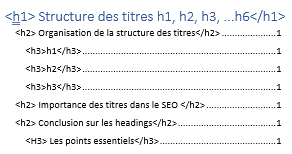
Your text should be organized into several parts, in a logical order. It should include different heading levels and short paragraphs. As you write, move from the general to the specific.
Users will then easily find the information they are looking for.
Headings
Your title should make people want to click and learn more. Choose it carefully. Do not make false promises to attract more people, simply describe your article.
Content
- Length. The text should be short, but not too short. An article should be at least 300 words. A reading that runs too long risks boring the reader.
- Paragraphs. Reading should be easy and smooth. Favor short paragraphs and line breaks.
- Vocabulary. It should be simple and clear, so everyone understands. Avoid jargon and overly complicated technical expressions.
- Spelling. Writing without mistakes is key to your credibility.
- Timeliness. The internet changes constantly and new content appears every second. So we recommend dating your content, especially if it covers an event.
Images
For even better readability, add images and illustrations to your content. They catch the reader's eye and enrich your article.
Writing attractive copy on Webflow, your turn
By applying these tips, your articles will become much more attractive. You now have everything you need to write content that keeps your readers.